
LCR, RPS, DMM and Temperature/Control
This chapter covers the four specialized workstations of the Mikrofab measurement software: LCR/Impedance (capacitance–voltage, capacitance–frequency, impedance spectroscopy, Mott–Schottky and temperature-resolved admittance sweeps), RPS (resonant piezo/acoustic spectroscopy), DMM Monitor (time-dependent live monitoring with a multi-function bench multimeter) and the Temperature/Control family (Set-Point voltage/current profiling and furnace-based Temperature Profiling). Each module is hosted inside exactly the same composite measurement frame as the transistor/diode panels: parameter panel on the left, live plot in the center, live readout panel on the right; with the shared Start / Stop / Save action bar at the bottom.
This chapter describes four different ways of "electrically listening" to a material or a device. Just as a physician sometimes checks a patient's pulse (DMM), sometimes runs an ECG (LCR/impedance), and sometimes performs a vibration test with a tuning fork (RPS), each workstation asks the sample a different "question"; you can think of it as connecting different diagnostic instruments to the same patient. The Temperature/Control modules, in turn, drive the voltage applied to the sample or the furnace temperature in a programmed manner over time.
- Why it is done: to learn a sample's capacitance, resistance, mechanical resonance, or how these quantities change with temperature, and thereby infer something about its internal structure.
- What it teaches / measures: it measures or applies quantities such as impedance, capacitance, resonance frequency, live readout values and applied temperature/voltage profiles.
- Where it is used: semiconductor / solar cell research, materials characterization, quality control and failure analysis.
1. LCR / Impedance Workstation
An LCR/impedance measurement applies a small alternating (AC) signal to the sample and measures "how much it resists" (its impedance); that is, it determines whether the material behaves more like a capacitor or more like a resistor. It is like gently vibrating a guitar string and listening to its response: it reveals the sample's capacitance and resistance at different DC voltages and frequencies. With plots such as Mott–Schottky, invisible physical quantities such as doping density and built-in voltage are also computed.
- Why it is done: to understand the charge distribution, the depletion region and the trap (defect) states in a semiconductor junction.
- What it teaches / measures: capacitance (C), impedance (Z), dissipation/quality factor (D/Q), and the doping density (N) and built-in voltage (V_bi) derived from them.
- Where it is used: solar cell/diode research, materials characterization and defect (trap) analysis.
Navigation key (nav_key): lcrws. The LCR module has a different execution path from the classic SMU measurements: its own LCR driver (not an SMU), its own LcrPvMeasurement runner, and it returns a Dataset instead of a (point, summary) pair. The panel gathers four measurement modes into a single form and shows the relevant field group according to the selected mode.
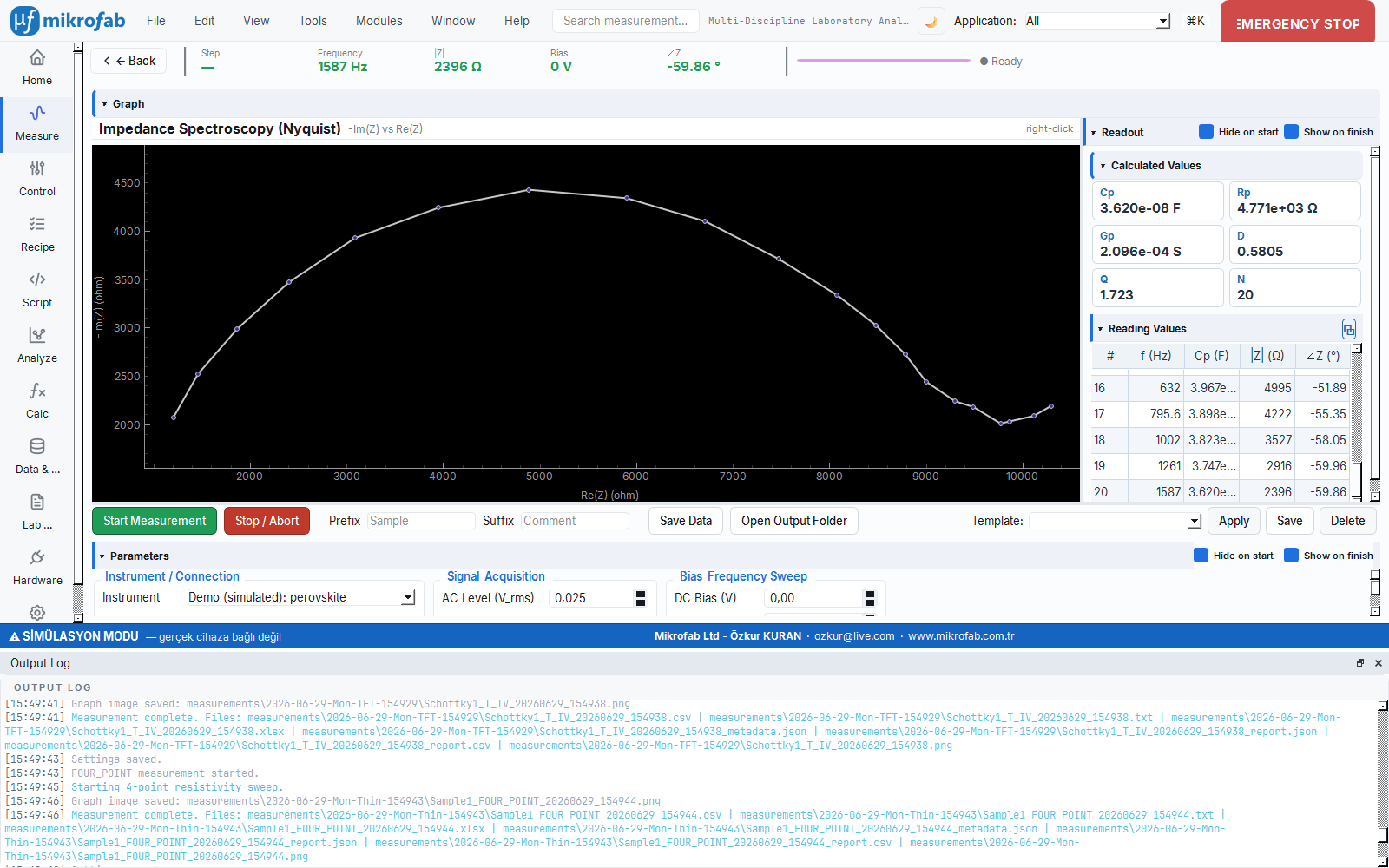
1.1 Measurement Modes
| Mode | Code | Held fixed | Swept | Live plot |
|---|---|---|---|---|
| C-V (capacitance–voltage) | cv | Frequency | DC bias | C vs Bias |
| C-f (capacitance–frequency) | cf | DC bias | Frequency (log) | C vs f (log-x) |
| Z-f (impedance spectroscopy) | zf | DC bias | Frequency (log) | Nyquist (−Im Z vs Re Z) |
| TAS (temperature-resolved admittance) | tas | DC bias | Frequency + Temperature | C vs f (for each T) |
1.2 Connection and Instrument
| Parameter | Unit | Description | Default |
|---|---|---|---|
| Instrument | — | Demo: <preset> (5 simulations) or a real E4980A / BK894 | Demo |
| VISA address | — | Enabled only with a real instrument (e.g. USB0::0x0957::...::INSTR) | (empty) |
| Mode | — | cv / cf / zf / tas | zf |
Simulation presets: perovskite, c_si, cigs, iii_v, opv. Real drivers: Keysight E4980A and B&K Precision BK894 (connected over the VISA transport).
1.3 Signal (Excitation) Parameters
| Parameter | Unit | Range | Description | Default |
|---|---|---|---|---|
| AC level | V rms | 0.005 – 0.1 | Small-signal excitation amplitude | 0.025 |
| Area | cm² | 1e-4 – 100 | Sample active area (for density-derived quantities) | 0.09 |
| Averaging | count | 1 – 16 | Number of averages per point | 4 |
| Settle | s | 0 – 10 | Wait before each point | 0.5 |
ac_level_warning) under the field.1.4 Sweep Parameters (by mode)
C-V (cv) group
| Parameter | Unit | Range | Default |
|---|---|---|---|
| Frequency (fixed) | Hz | 1e3 – 1e6 | 100000 |
| Bias start | V | −40 – 40 | −1.0 |
| Bias stop | V | −40 – 40 | 0.5 |
| Bias step | V | 0.005 – 5.0 | 0.02 |
C-f / Z-f / TAS frequency group
| Parameter | Unit | Range | Default |
|---|---|---|---|
| Bias (fixed) | V | −40 – 40 | 0.0 |
| f_min | Hz | 0.01 – 1e6 | 20.0 |
| f_max | Hz | 1.0 – 2e6 | 1e6 |
| Points per decade (ppd) | count/decade | 1 – 40 | 10 |
TAS temperature group (tas only)
| Parameter | Unit | Range | Default |
|---|---|---|---|
| T start | K | 4 – 400 | 150.0 |
| T stop | K | 4 – 400 | 350.0 |
| T step | K | 1 – 100 | 10.0 |
bias_start ≠ bias_stop and in frequency sweeps f_min < f_max must hold; otherwise Start is blocked and an inline error message is shown.1.5 Read and Derived Quantities
Each point carries the raw complex impedance (z_re, z_im). The readout panel on the right and the live plot derive the parallel-equivalent circuit quantities from the raw impedance (not the heavy P14 analysis engine; a single-source lightweight formula):
ω   = 2·π·f
|Z| = hypot(z_re, z_im)
∠Z  = atan2(z_im, z_re)        [degrees]
Y   = 1/Z = (z_re − j·z_im) / |Z|²
Gp  = Re(Y) = z_re / |Z|²       [S]   (parallel conductance)
Bp  = Im(Y) = −z_im / |Z|²
Cp  = Bp / ω                    [F]   (parallel capacitance)
Rp  = 1 / Gp                    [Ω]   (parallel resistance)
D   = Gp / Bp                          (dissipation factor)
Q   = 1 / D                            (quality factor)
The Calculated Values section of the readout panel live-updates the Cp / Rp / Gp / D / Q cards plus a point counter (n). The Read Values table accumulates, row by row, the x-axis (bias in C-V, frequency otherwise) and the Cp / |Z| / ∠Z columns according to the mode; the ⧉ button in the header opens the readout list in a floating window.
| Quantity | Symbol | Unit | Source |
|---|---|---|---|
| Parallel capacitance | Cp | F | Im(1/Z)/ω |
| Parallel resistance | Rp | Ω | 1/Gp |
| Parallel conductance | Gp | S | Re(1/Z) |
| Dissipation factor | D | — | Gp/Bp |
| Quality factor | Q | — | 1/D |
| Impedance magnitude | |Z| | Ω | hypot(z_re, z_im) |
| Impedance phase | ∠Z | ° | atan2(z_im, z_re) |
1.6 Mott–Schottky and Physics Basis
The simulation is based on sound physics models (analysis_kit/sim). C-V mode produces the depletion capacitance via the Mott–Schottky relation:
Here ε = εr·ε0 (dielectric permittivity), A is the area, V_bi is the built-in voltage, N is the effective doping, and q is the electron charge. N is extracted from the slope of the 1/C² – V plot and V_bi from its axis intercept (standard Mott–Schottky analysis). The bias is clamped above V_bi − 0.05 V (to prevent the W→0 blow-up).
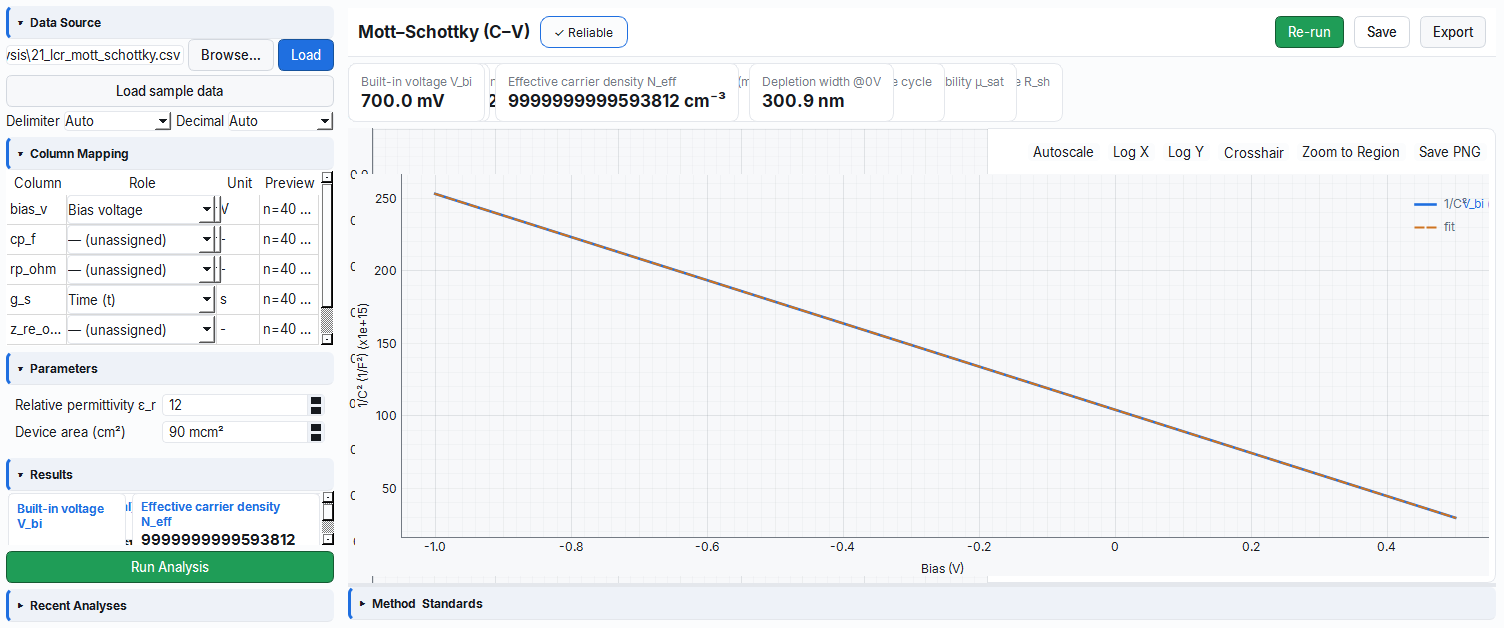
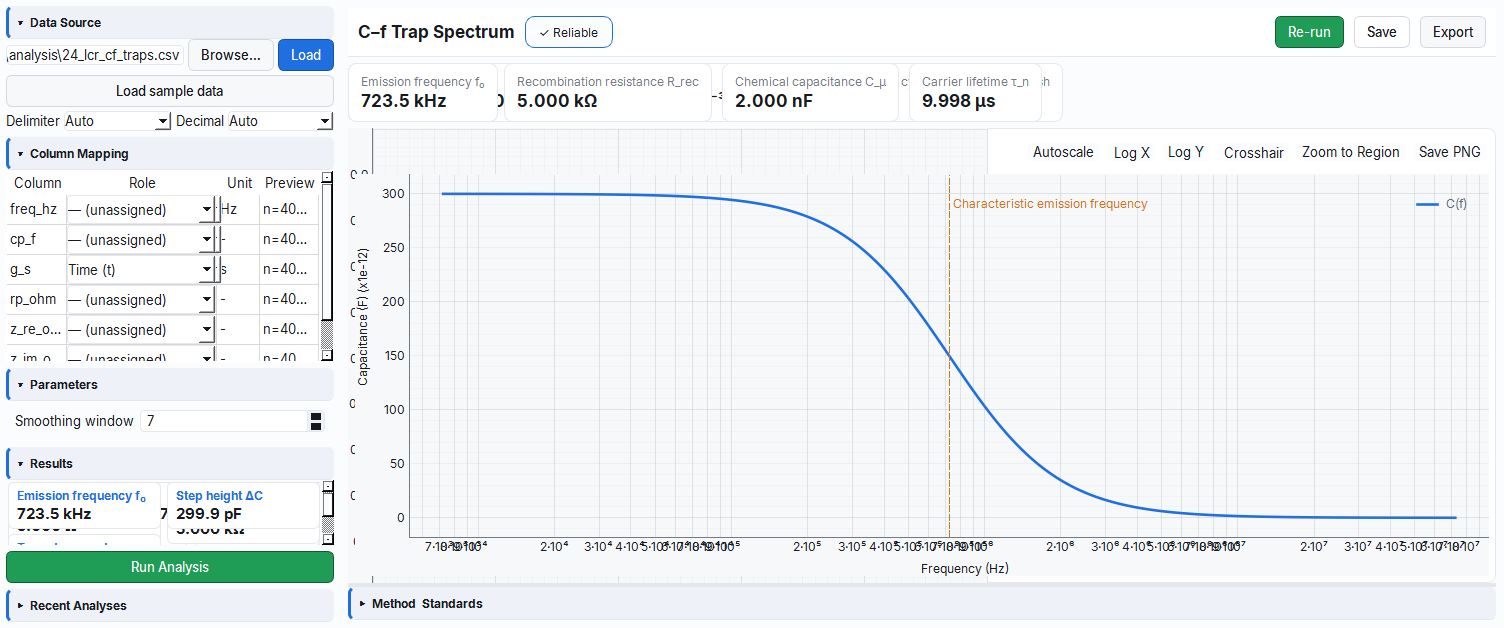
1/C² – V plot and the built-in voltage V_bi from the axis intercept.In C-f / TAS mode the capacitance is the sum of the geometric capacitance + trap Debye contributions + Urbach band-tail:
C(ω) = C_geo + Σ_i  dC_i / (1 + (ω/ω_i)²)
ω_i(T) = 2·ν0·T²·exp(−E_i / kT)         (trap characteristic frequency)
Z-f mode produces the equivalent-circuit impedance: R_s − (R_tr‖C_geo) − (R_rec‖C_mu or CPE) − (low-f Warburg). This physics mimics the behavior of real perovskite/c-Si/CIGS/III-V/OPV devices.
1.7 Mock Behavior
The simulated LCR meter (SimulatedLcrMeter) runs the selected preset with noise_rel = 0.005 (0.5% relative noise). It is deterministic: the same seed → the same sequence; in noiseless mode (noise_rel=0) it returns the exact analytical value. Saving: the Save button writes the last Dataset to disk with the composite prefix/suffix (save_dataset). The sim generators (generate_cv/cf/zf/tas) are pure NumPy; they run without Qt and without SCPI, and they also feed the golden tests of the Analysis module.
2. RPS — Resonant Piezo / Acoustic Spectroscopy
RPS applies a vibration (a drive signal) to the sample and searches for the resonance frequency at which it "rings" most strongly; it is like tapping the rim of a glass and finding the note at which it rings most beautifully. The position and sharpness of this resonance reveal information about the material's stiffness (mechanical modulus) and piezoelectric strength (d₃₃). Moreover, by tracking how this resonance shifts as the temperature changes, phase transitions can be studied.
- Why it is done: to quantify a material's mechanical resonance and its piezoelectric/electrostrictive behavior as a function of temperature.
- What it teaches / measures: the resonance frequency f₀, the quality factor Q, the linewidth FWHM, and relative changes in d₃₃ / modulus / damping.
- Where it is used: piezoelectric/ferroelectric materials research and temperature-dependent phase-transition studies.
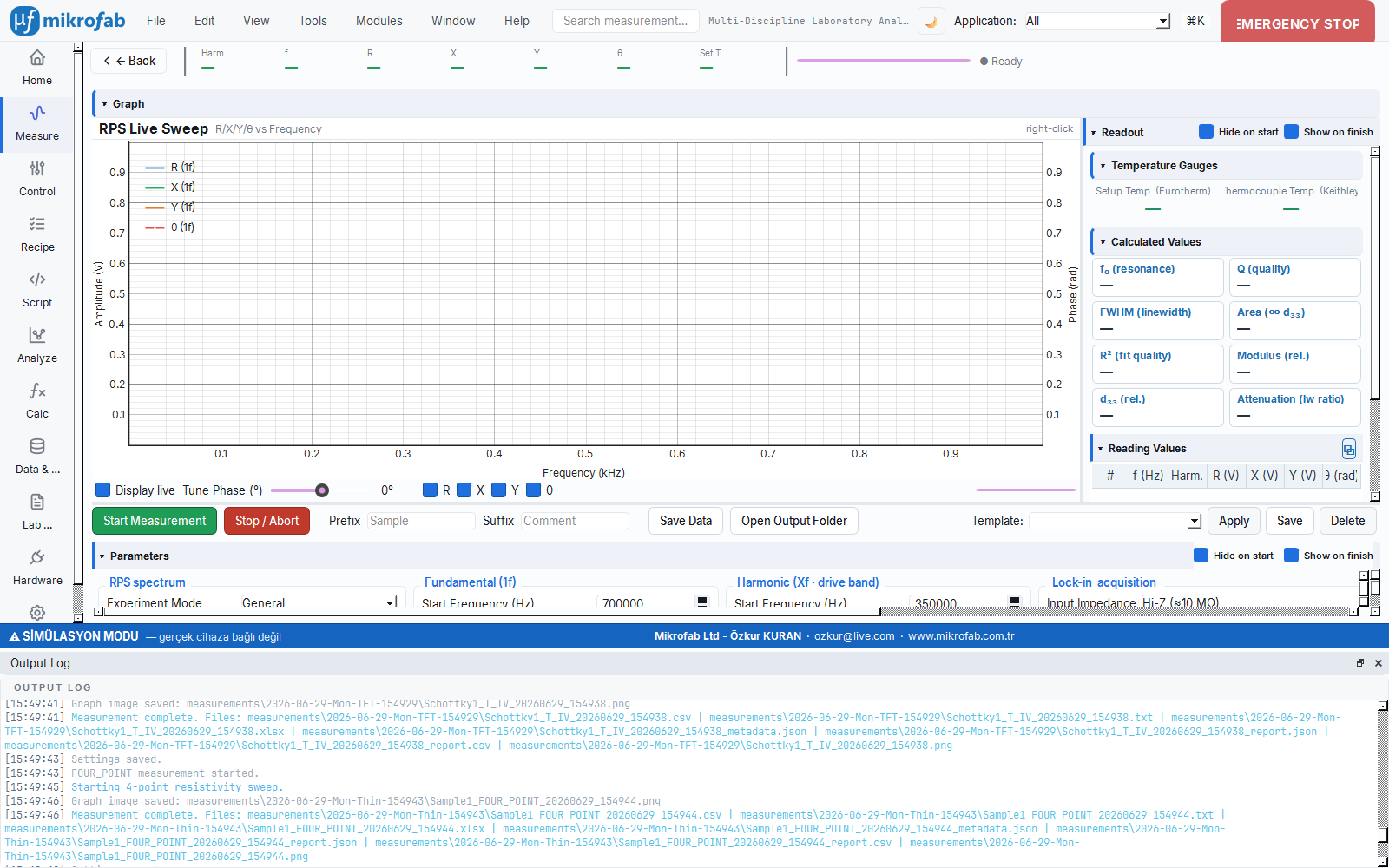
Navigation key: rpsws. RPS is a three-instrument measurement that works with a lock-in amplifier (Zurich Instruments MFLI), a furnace controller (Eurotherm or Sun EC10) and a sample thermometer (Keithley 2000). It scans the piezoelectric/electrostrictive mechanical resonance by sweeping the drive frequency; it supports harmonics, temperature and voltage as axes. The panel presents seven cards + two collapsible sections (Temperature Profile, Voltage Profile) in a masonry (responsive card) layout that mirrors the legacy LabVIEW front panel.
2.1 Mode Controls
| Parameter | Options | Description |
|---|---|---|
| Experiment mode | GENERAL / VOLTAGE / TIME | Outer sweep axis: T only / T→V / fixed (repeated) |
| Spectrum mode | 1f / Xf / 1f&Xf | Harmonic selection: fundamental / harmonic X / both |
| Harmonic X | 2 – 10 | Harmonic index of the Xf channel (default 2) |
| Drive amplitude | 0 – 10 Vpp | Fixed excitation in GENERAL/TIME mode (default 1.0) |
GENERAL sweeps temperature only; VOLTAGE sweeps voltage within temperature (requires at least one Voltage Segment); TIME repeats time_repeats times at a fixed (T, V) point.2.2 Frequency Controls (1f and Xf independent)
Each harmonic channel has its own frequency configuration (FreqConfig):
| Parameter | Unit | Range | 1f default | Xf default |
|---|---|---|---|---|
| Start | Hz | 1e4 – 5e6 | 700000 | 350000 |
| Stop | Hz | 1e4 – 5e6 | 900000 | 450000 |
| Number of points (n_points) | count | 2 – 100000 | 4000 | 4000 |
| Time constant (tc) | s | 1e-4 – 10 | 0.030 | 0.030 |
| Input range (range) | V rms | 1e-7 – 10 | 300e-6 | 300e-6 |
| Auto-TC (auto_tc) | — | on/off | off | off |
harmonic_x × drive frequency; therefore, to probe the same mechanical resonance (700–900 kHz) on the 2f channel, the drive is swept at 350–450 kHz (2× = 700–900). This default is editable.2.3 Lock-in and Temperature
| Parameter | Options / Range | Default |
|---|---|---|
| Input impedance | 50 Ω / Hi-Z (≈10 MΩ) | Hi-Z |
| Differential input (diff) | on/off | on |
| Temperature stage | YDG-1206 (30…1200 °C) / LMS3620 (−180…500 °C) / EC10 (−184…315 °C) | YDG-1206 |
| Return to room temperature at end | on/off | off |
| Stay duration (stay) | min (0–480) | 0 |
| Time repeats (time_repeats) | 1 – 9999 | 1 |
| Wait between scans | s (0–3600) | 0 |
| Rotate phase (rotate_phase) | on/off | off |
| Tune phase (tune_phase) | ° (−180…+180) | 0 |
2.4 Temperature Profile (segment table)
The Temperature Profile section contains the global ramp/settle parameters + the segment table + the preview plot + the summary statistics.
| Global parameter | Unit | Range | Default |
|---|---|---|---|
| Ramp | °C/min | 0.1 – 100 | 5 |
| Settle | s | 0 – 3600 | 30 |
| Tolerance (tol) | °C | 0.1 – 50 | 1 |
| Settle source | Sample TC / Furnace PV | — | Sample TC |
Each row is a temperature segment (start/stop/step, °C; table range −200…1300 °C, step 0.1…500). The number of set-points is derived as round(|stop − start| / step) + 1. The preview draws the segments as a staircase (each transition: ramp to the new set-point + flat settle); the summary boxes show the set-point count, the estimated duration and the temperature range.
tol_c of the set-point (more rigorous; waits for the real sample temperature). Furnace PV tracks the Eurotherm process value (faster; absorbs the furnace→sample thermal lag with the settle_s wait).2.5 Voltage Profile (VOLTAGE mode only)
At most 9 voltage segments (start_v / end_v / step_v; range 0–10 V, step 0.001–5). Only the enabled (checked) segments are included in the plan. At each temperature step, the drive amplitude is swept across the start_v → end_v range with a step_v step.
2.6 Read Quantities and Phase Rotation
The lock-in produces four quantities at each point: R (amplitude), X and Y (quadrature components) and θ (phase, radians). The live plot is dual-axis: the left axis is Amplitude (V) — the R/X/Y traces; the right axis is θ (rad). The 1f traces are solid, the Xf traces are dashed; Xf is drawn only when the spectrum mode includes Xf.
Tune-phase rotation rotates the display phase without corrupting the data (M-5 two-buffer; the raw data is stored, and the display is rebuilt on each change):
X' =  X·cos(φ) − Y·sin(φ)
Y' =  X·sin(φ) + Y·cos(φ)
θ' =  atan2(Y', X')
R' =  hypot(X', Y')
Above the plot there is a −180…+180° slider, R/X/Y/θ toggle boxes, a "show while measuring" switch and a progress bar.
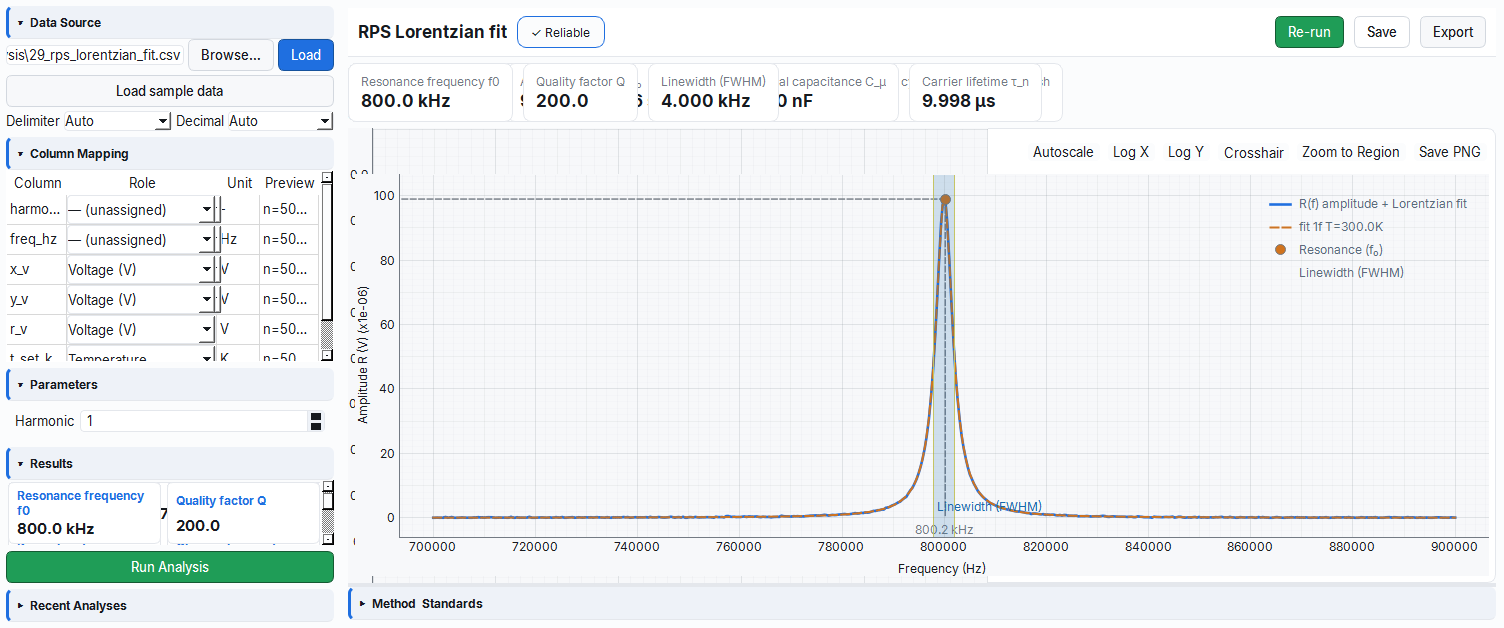
2.7 Calculated Metrics (end-of-run Lorentzian fit)
When the run finishes, a Lorentzian is fitted to the 1f spectrum and summary metrics are computed (compute_live_metrics):
| Metric | Symbol | Unit | Description |
|---|---|---|---|
| Resonance frequency | f₀ | kHz | Lorentzian peak position |
| Quality factor | Q | — | f₀ / FWHM |
| Linewidth | FWHM | kHz | Full width at half maximum |
| Area | A | V·Hz | Area under the peak (∝ d₃₃ piezo coefficient) |
| Goodness of fit | R² | — | Fit quality |
| Modulus (relative) | — | — | Temperature-relative (in runs with ≥2 T) |
| d₃₃ (relative) | — | — | Temperature-relative (in runs with ≥2 T) |
| Damping | — | — | Temperature-relative (in runs with ≥2 T) |
The last three metrics require at least two temperature runs; at a single temperature they show "—". The right panel also has a Temperature Indicators (furnace PV + sample TC) section.
2.8 Duration Estimate, Mock and Validation
Duration estimate (Refresh button):
Mock behavior: If all three instruments are simulated, a BaTiO₃-like physics model (RpsSimModel) + a live sample-temperature provider is attached to the lock-in; the spectra evolve with temperature and drive amplitude (field-driven RPS). In a simulated sweep, a delay of ~2 ms per point is added, so the mock run plot comes alive point-by-point (a 4000-point sweep is drawn in ~8 s). The simulated furnace PV jumps instantly to the set-point (it does not wait for a real-minutes ramp); the sample TC tracks the furnace with a short delay.
drive_vpp ≤ 10 Vpp (MFLI output limit); segment counts ≤ 9; VOLTAGE mode requires ≥1 voltage segment; start_hz < stop_hz for each channel; all planned temperatures within the selected stage limits. With an invalid plan, Start is disabled and an inline error is shown.3. DMM Monitor — Live Readout and Logging
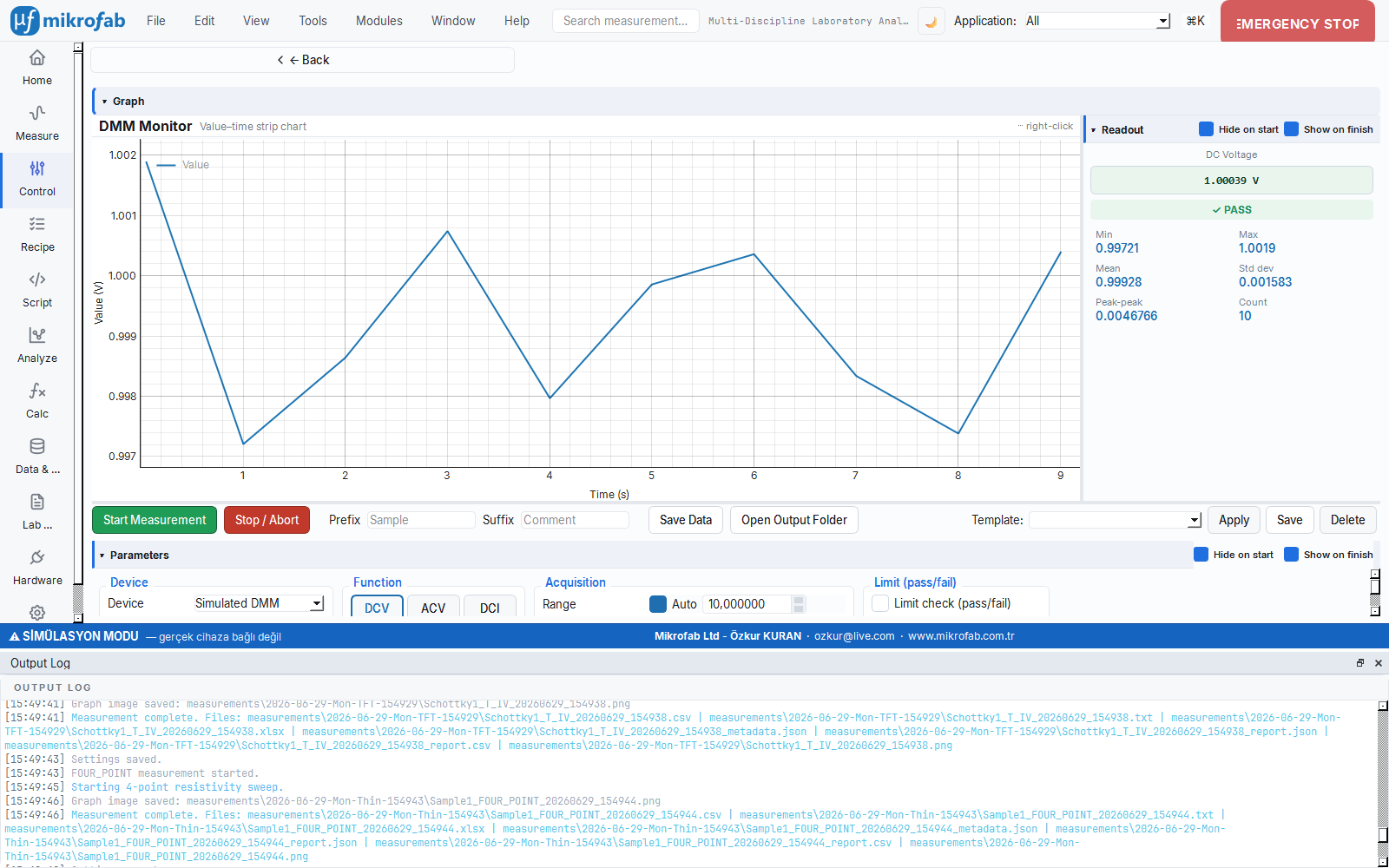
The DMM Monitor is a "data recorder" that keeps a multimeter (a bench instrument that measures voltage, current, resistance, temperature...) continuously on and logs its readings over time. It is like connecting a patient's pulse to a monitor and watching it for hours: it shows how a single quantity changes over time with a live plot and statistics. If you wish, you can set a pass/fail band and have it automatically check whether the value goes out of bounds.
- Why it is done: to monitor the stability, drift or noise of a signal (voltage, current, temperature...) over time.
- What it teaches / measures: the instantaneous value of the selected function and live statistics such as min/max/mean/standard deviation.
- Where it is used: long-term stability tests, quality control and laboratory monitoring/logging.
Navigation key: dmmmon. The DMM Monitor performs time-dependent continuous monitoring + logging with a multi-function bench multimeter (or an SMU's "DMM duty"). The panel is a semi-skeuomorphic "virtual front panel" that gives the feel of a real instrument: a keypad (function/range/speed/time/limit) on the left, and on the right a readout panel with a large "7-segment" display + live statistics.
3.1 Functions
Twelve mutually-exclusive function keys (like the instrument's own function keys):
| Key | Function | Key | Function |
|---|---|---|---|
| DCV | DC voltage | Period | Period |
| ACV | AC voltage | Temp | Temperature |
| DCI | DC current | Cont | Continuity |
| ACI | AC current | Diode | Diode |
| 2W | 2-wire resistance | Cap | Capacitance |
| 4W | 4-wire resistance | Freq | Frequency |
Default: DCV. Functions not supported by the selected instrument are disabled.
3.2 Range, Speed and Time
| Parameter | Unit | Range | Default |
|---|---|---|---|
| Autorange | — | on/off | on |
| Manual range | (by function) | 1e-6 – 1e9 | 10 |
| Speed (NPLC) | — | Fast=0.1 / Medium=1.0 / Slow=10.0 | Medium (1.0) |
| Sampling interval (interval) | s | 0.02 – 3600 | 1.0 |
| Indefinite | — | on/off (∞) | on |
| Duration | s | 0.1 – 1e6 | 60 |
3.3 Limit Band (Pass/Fail)
| Parameter | Unit | Range | Default |
|---|---|---|---|
| Limit enabled | — | on/off | off |
| Low limit (low) | (function unit) | −1e9 – 1e9 | −1.0 |
| High limit (high) | (function unit) | −1e9 – 1e9 | 1.0 |
When the limit is enabled, low/high lines + a green pass-band in between are shown on the live plot; the readout panel lights a ✓ PASS / ✕ FAIL badge at each sample. When the band is exceeded, a limit_violated warning appears in the status bar.
3.4 SMU "Voltmeter Duty"
A source-measure unit (SMU/PSU) selected from the inventory can be used like a DMM. In the voltage function the SMU forces 0 A; with an open input, the reading drifts to ±compliance. For this reason, when an SMU is selected the panel shows a compliance/range (V) field (0.2–200 V, default 2.0) and, in the voltage function, an amber open-input warning. A low compliance limits this drift and puts the SMU into a low-noise range.
3.5 Read Quantities and Statistics
The readout panel shows the large instantaneous value (function + unit); on overflow it shows OL (overload). Below it is an incremental statistics grid using the Welford algorithm:
| Statistic | Symbol | Description |
|---|---|---|
| Min / Max | — | Smallest / largest reading |
| Mean | x̄ | Run mean (incremental) |
| Std deviation | σ | Standard deviation (Welford) |
| Peak-to-peak | p-p | max − min |
| Count | n | Total number of samples |
The live plot is a single-trace strip-chart (value vs elapsed time); pyqtgraph applies an SI prefix for the unit (mV/µA/kΩ…). Overflow readings are not fed into the trace; they are shown with a separate red "×" marker.
measure_v capability + connected/IDLE state). When SIM is selected, SimulatedMultimeter generates a synthetic value appropriate to the function. Save writes the readings to CSV; the first two columns are elapsed_s + timestamp (each file is self-describing — a zero-setup origin).4. Set-Point Profile (Voltage/Current Control)
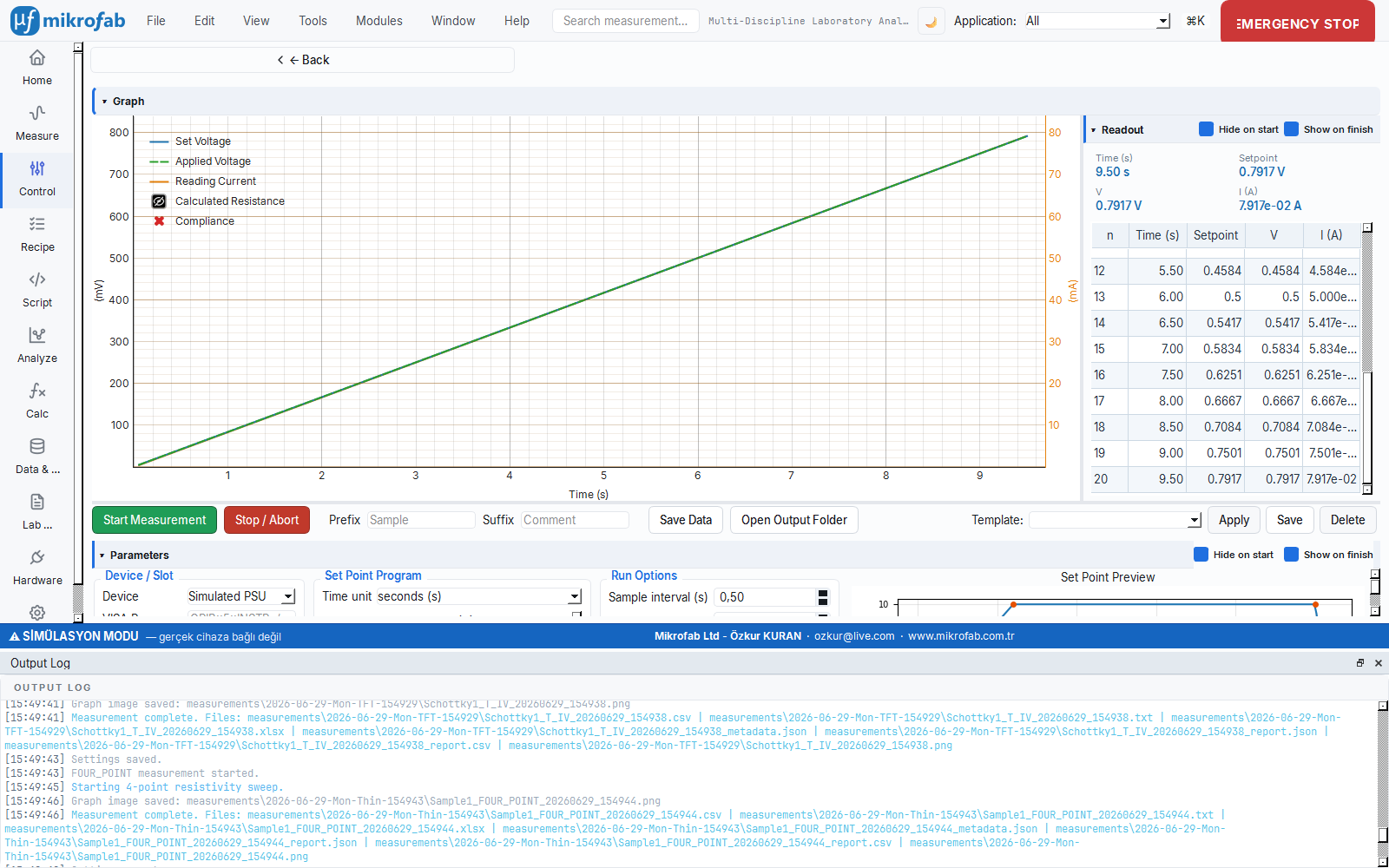
The Set-Point Profile drives the output of a power supply or an SMU over time according to a recipe you draw in advance: "rise from 0 V to 10 V over so many seconds, hold for a while, then come back down". It is like setting a timer on an oven and changing the temperature in stages, but here for electrical voltage/current. At the same time it live-reads and records the sample's response (e.g. the current flowing in response to the driven voltage).
- Why it is done: to stress the sample with a controlled, repeatable voltage/current program and observe its response (e.g. stress testing, aging).
- What it teaches / measures: the applied set-point, the instrument's read-back, the other measured quantity (V↔I) and the derived resistance R = V/I.
- Where it is used: endurance/stress tests, controlled supply scenarios and production/quality flows.
Navigation key: profile. The Set-Point Profile is a control module that drives a source (PSU or SMU) over time along a programmed voltage/current profile (ramp + hold) while reading simultaneously. The left panel has the instrument, the program table, the options and the live preview; the right has the live readout.
4.1 Instrument and Quantity
| Parameter | Options | Description |
|---|---|---|
| Instrument | Simulated PSU (SIM) / SMU / inventory instruments | In simulation only SIM; real ones from the live inventory |
| VISA address | — | Enabled only for a manually-addressed static PSU |
| Channel | 1 – 3 | For multi-channel PSU (hidden for SMU) |
| Quantity | Voltage / Current | The driven quantity (a V profile reads I; an I profile reads V) |
| Time unit | s / min / h | Program table time scale |
source_v capability; an instrument that is not auto-discovered appears in the list automatically once it is added and verified from the Hardware page.4.2 Program Table
Each row is a breakpoint: (time, target, interpolation). The interpolation is ramp (linear transition between points) or step. The default voltage program:
| Time (s) | Target (V) | Interp |
|---|---|---|
| 0 | 0.0 | ramp |
| 120 | 10.0 | ramp |
| 500 | 10.0 | ramp |
| 520 | 0.0 | ramp |
The target column rescales according to the quantity: voltage −60…60 V (3 decimals), current −6…6 A (5 decimals). The preview draws the profile with 200 samples (setpoint_at) and shows the breakpoints with orange markers.
4.3 Options
| Parameter | Unit | Range | Default |
|---|---|---|---|
| Sampling interval | s | 0.01 – 3600 | 0.5 |
| Settling | s | 0 – 100 | 0.05 |
| NPLC | — | 0.01 – 100 | 1.0 |
| Current/Voltage limit | A or V | 0 – 1000 | 0.1 (V profile) / 20 (I profile) |
| Power limit | W | 0 – 1000 | 20.0 |
| Hold last value (hold_last) | — | on/off | off |
4.4 Live Plot (three-axis) and Readout
The profile plot has a single X (time) and three Y axes:
- Left axis — the driven quantity: Set (command) + Applied (instrument read-back, if available).
- Right axis — the other read quantity: Reading (I in a V profile, V in an I profile).
- Far-right axis — Calculated Resistance R = V/I (Ω, hidden by default).
Compliance (CC) points are shown with separate red markers. All Y axes are aligned at a common 0 level; each trace can be toggled on/off from the right-click menu, and as you hover with the mouse a time line + all values inside a box are read (snap-to-data). The readout panel keeps four instantaneous cards (t / set-point / V / I) + a growing row table.
make_power_supply sets up a simulated PSU. Save writes the measurement points of the last run to CSV (MeasurementPoint fields).5. Temperature Profile (Furnace Control)
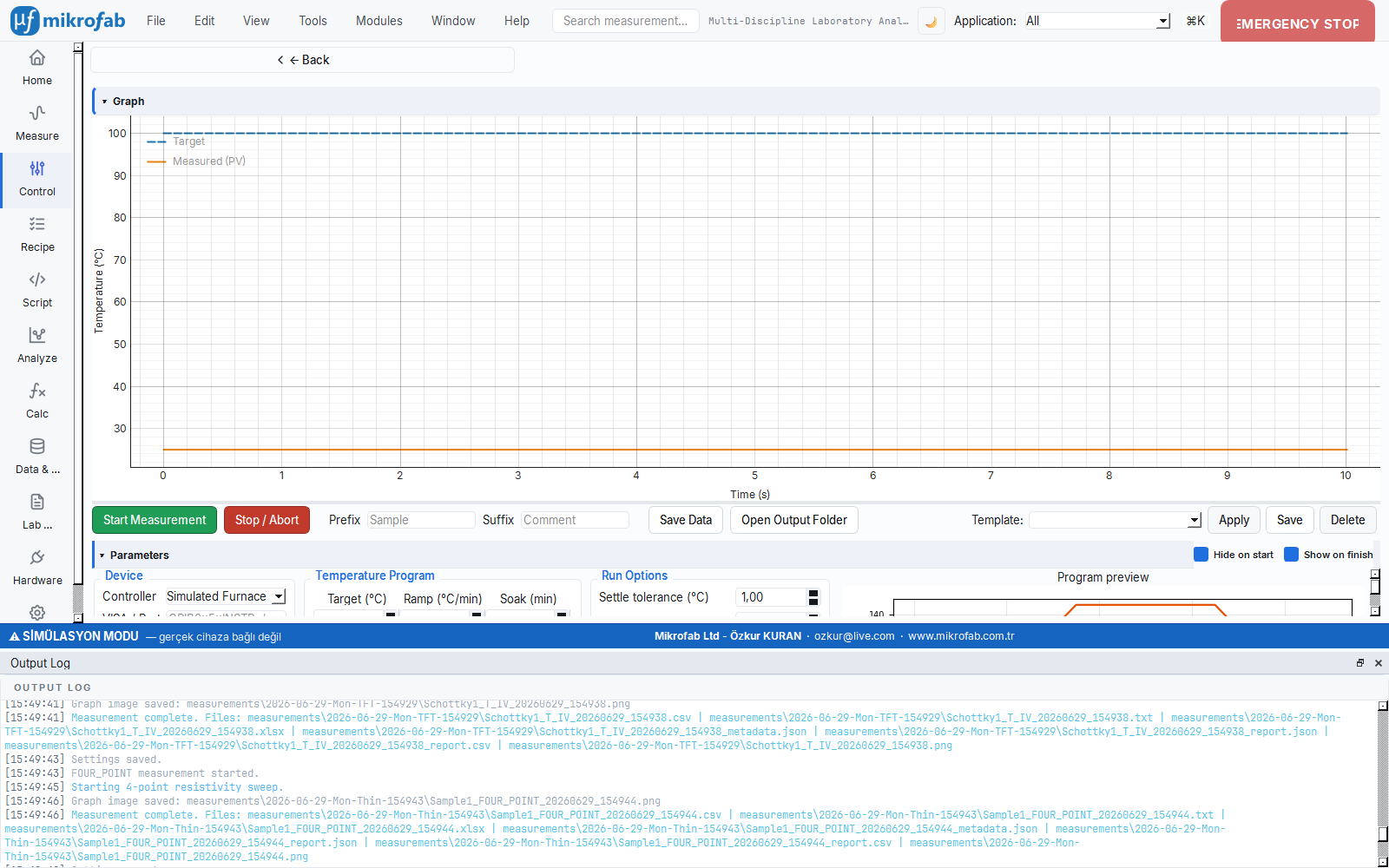
The Temperature Profile drives a furnace/temperature stage step by step according to a recipe: ramp up to a target at a certain rate (ramp), hold there for a while (soak), then move on to the next target. It is like programming a baking oven to "heat to 180 °C, bake for 30 min, then cool down". The software waits until the sample's real temperature gets close enough to the target (the settle tolerance) and only then advances; this way each step is reliable.
- Why it is done: to expose the sample to a known, repeatable temperature history (annealing, preparation for temperature-dependent measurement).
- What it teaches / measures: the target temperature, the measured process value (PV), the phase (ramp/soak) and the settle state — all over time.
- Where it is used: heat treatment/annealing, temperature-resolved experiments and process validation.
Navigation key: tempprofile. The Temperature Profile is a control module that drives a furnace controller (Eurotherm / Sun EC10) through a sequence of segments (target + ramp + soak) and gates on the sample temperature according to a settle tolerance. The segment model is furnace-native: it uses the instrument's own ramp rate (RATE); the engine gates the PV (process value) according to the tolerance (ADR 0026).
5.1 Instrument and Segment Table
| Parameter | Options / Range | Default |
|---|---|---|
| Instrument | Simulated (SIM) / Sun EC10 / Eurotherm 3500 / inventory | SIM |
| VISA/port | (e.g. GPIB0::5::INSTR, COM3) | — |
Each segment: (target °C, ramp °C/min, soak min).
| Segment field | Unit | Range | Default |
|---|---|---|---|
| Target | °C | −100 – 1000 | (by row) |
| Ramp | °C/min | 0 – 999.99 | 5.0 |
| Soak (hold) | min | 0 – 100000 | (by row) |
Default program: (100 °C, 5 °C/min, 10 min) → (150 °C, 5 °C/min, 30 min) → (25 °C, 5 °C/min, 0 min). The preview draws the program as a staircase (program_staircase) and shows the estimated total duration.
5.2 Options
| Parameter | Unit | Range | Default |
|---|---|---|---|
| Settle tolerance (settle_tol) | °C | 0.1 – 50 | 1.0 |
| Settle timeout (settle_timeout) | min | 0.5 – 600 | 30 |
| Sampling interval | s | 0.5 – 600 | 2.0 |
| Starting temperature (preview) | °C | −100 – 1000 | 25 |
| Return to ambient (return_ambient) | — | on/off | on |
| Return temperature | °C | −100 – 1000 | 25 |
| Hold last value (hold_last) | — | on/off | off |
return_temp value at 5 °C/min when the program ends (safe shutdown).5.3 Phase Flow and Readout
The engine passes through the following phases in order on each segment: ramp (ramp to target) → soak (hold at target temperature) → once the segments are done, an optional hold and return (return to ambient). The status bar shows the connecting / ramping / soaking / holding / returning / done / aborted tokens, translated.
The readout panel presents a large PV display (°C) + the target (a ✓ mark when settled) + the phase + the segment (seg+1 / total) + the soak countdown (mm:ss). The live plot has two traces: Target (blue dashed) + PV (orange solid), on the time axis; NaN PV (read error) points are skipped.
make_furnace_controller(..., mock=True) sets up a simulated furnace; the PV tracks the set-point with a ramp model. Save writes the run's TempProfilePoint rows to CSV.Common Notes
- Save: Each module writes the last run to the relevant format with the composite prefix (LCR/RPS → Dataset, Profile/TempProfile/DMM → CSV). On a failed connection the application does not crash; a translated error message is shown in the status bar.
- Language/Theme: All panels support EN+TR i18n (
tr()) and light/dark theme (apply_theme); user text is not hard-coded.